

Dr pen speed setting for face
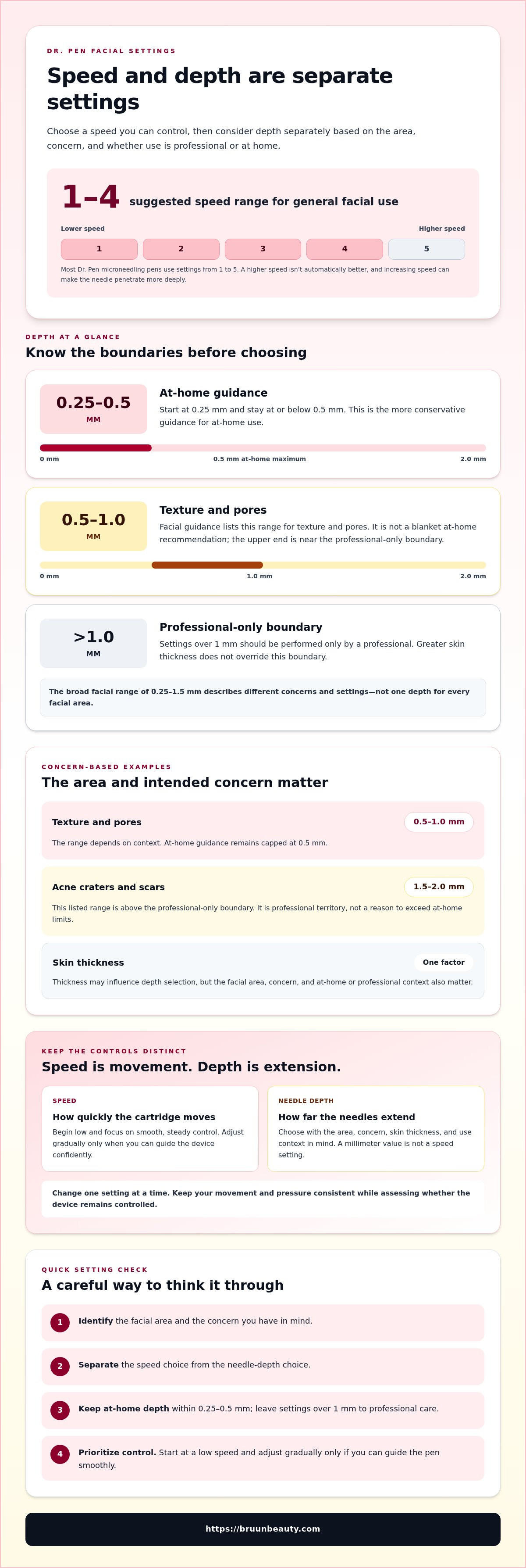
A higher speed isn’t automatically better for facial microneedling. For general facial use, a Dr. Pen speed setting for your face typically falls between 1 and 4, with lower speeds offering more control around sensitive areas; needle depth is a separate setting that should reflect the area and skin thickness.
Before you begin, understand that speed and needle depth serve different purposes. This guide explains how to choose a cautious Dr. Pen speed setting for your face, why facial areas may call for different settings, and how skin thickness relates to needle depth.
You’ll also find professional safety guidance, including the recommendation that depths over 1 mm be performed only by a professional. Use these details to understand the settings and decide whether facial microneedling is appropriate for your experience and the area you have in mind.
Key Takeaways
- For general facial microneedling, use a lower speed for control; the suggested range is 1 to 4, with sensitive areas often calling for gentler settings.
- Speed and needle depth are different controls. Dr. Pen US notes that increasing the speed can make the needle penetrate the skin more deeply.
- Skin thickness and the area being worked on affect depth selection. Facial depths vary by concern, and depths over 1 mm are for professional treatment.
- At-home guidance favors conservative depth. Understand the limits before choosing a setting, especially around delicate facial areas.
- Once you understand device settings, explore how a microneedling serum fits into your skincare setup and the role it can play alongside your device.
Professional microneedling and safety guidance
Needle depth is the distance the cartridge needles extend toward your skin. Facial guidance spans 0.25 to 1.5 mm, depending on the concern. That broad range describes different settings, not one depth for every facial area.
Skin thickness describes how much tissue lies beneath an area’s surface. It can influence depth selection, but it isn’t the only factor. The facial area, your concern, and whether you’re using the device at home or in a professional setting also matter.
Professional depth boundaries
Professional-only depth means settings over 1 mm should be performed only by a professional. This boundary matters because some facial concerns have guidance above that level. A deeper setting isn’t automatically appropriate just because skin feels thicker or the concern seems more pronounced.
For texture and pores, facial guidance gives a depth of 0.5 to 1.0 mm. The upper end reaches the professional-only boundary. Don’t treat this range as a home-use recommendation; the at-home guidance is more conservative.
At-home depth guidance starts at 0.25 mm and sets a maximum of 0.5 mm. Keep that limit in mind when comparing broader facial ranges. Depths over 1 mm belong to professional care, even when a concern appears to call for a greater needle extension.
These recommendations serve different contexts. The 0.25 to 1.5 mm facial range varies by concern, while at-home guidance caps depth at 0.5 mm. The professional boundary applies above 1 mm. Keeping those distinctions clear prevents a broad range from being mistaken for a universal instruction.
How concern and thickness factor in
Concern-based depth means the intended skin concern helps guide the selected needle extension. Guidance for texture and pores lists 0.5 to 1.0 mm. For acne craters and scars, it lists 1.5 to 2.0 mm, which falls above the professional-only boundary.
Thicker skin may call for a slightly deeper setting for acne scarring. That factor doesn’t cancel the professional boundary. The listed 1.5 to 2.0 mm range remains professional territory, not a reason to exceed the at-home limit.
Millimeter measurement expresses needle depth as a length. For example, 0.5 mm describes needle extension, not device speed. Read each control separately so a speed number doesn’t get mistaken for a depth measurement.
Make a careful setting decision
Before selecting a depth, identify the area, the concern, and whether the session is professional or at home. Then compare the intended setting with the appropriate guidance. For home use, begin at 0.25 mm and stay at or below 0.5 mm.
- Use the facial area and concern to inform depth selection.
- Keep at-home depth within the 0.25 to 0.5 mm guidance.
- Leave settings above 1 mm to professional care.
- Don’t use thicker skin as a reason to ignore depth boundaries.
Separate controls means treating speed and depth as distinct settings. Speed affects needle movement, while depth sets how far the needles extend. Changing speed doesn’t replace a depth decision, and choosing a depth doesn’t make every speed appropriate.
For example, a 0.5 mm depth remains within the at-home limit, but that number alone doesn’t determine speed or technique. Consider the area and your ability to guide the device steadily. Keep each adjustment deliberate instead of changing several settings together.
For acne scars, the suggested 1.5 to 2.0 mm range makes the professional boundary especially relevant. For texture and pores, the 0.5 to 1.0 mm guidance still requires attention to context. Your first decision is not simply which number to select; it’s which setting range matches the area, concern, and type of use.
Speed guide
Speed setting controls how quickly the cartridge moves during a pass. Most Dr. Pen microneedling pens use settings from 1 to 5. Think of the numbered control as a range for adjusting movement, not a score that tells you how effective a session will be.
Setting selection means choosing a speed you can manage consistently across the planned area. If you’re learning to handle the device, start at a lower setting. Aim for steady control, not a higher number or a quicker pass.
Build familiarity with the device
Handling familiarity is your ability to guide the pen smoothly with even pressure. Begin at a low setting and focus on controlled movement. Keep your hand relaxed and notice whether the cartridge glides evenly rather than catching or skipping.
Change one setting at a time. For example, keep your hand movement and pressure consistent while adjusting the speed. If you change speed, pressure, and direction together, it’s harder to tell which adjustment affected your control.
Gradual adjustment means increasing the setting only after you can guide the device confidently. Move up in small increments on the dial instead of jumping from the lowest to the highest setting. If your movement becomes less precise, return to the previous setting.
Notice how speed affects your pass
Pass consistency means keeping the pen’s movement and pressure steady across the area. Experts note that increasing the speed can make the needle penetrate the skin more deeply. Don’t assume a faster setting changes only the pace.
Notice how the cartridge moves as you guide it. If you feel tempted to press harder because the pen seems to move quickly, pause and reset your grip. Pressure is a separate part of handling, so don’t use it to compensate for a speed setting that feels difficult to control.
Control check is a brief pause to assess whether you can maintain a smooth path. After changing the dial, make a controlled pass and assess your handling before continuing. If your hand wobbles or your pressure shifts, lower the speed and regain steady movement.
Keep adjustments deliberate
Deliberate adjustment means changing speed for a clear reason, rather than choosing a higher number out of habit. Before moving the dial, consider whether your current setting allows steady handling. If you’re new to the device, familiarity matters more than trying several settings in one session.
- Start low when learning the pen’s movement.
- Keep hand pressure and direction steady during a speed change.
- Assess control before continuing at the adjusted setting.
- Lower the speed if you can’t guide the cartridge smoothly.
Separate setting decisions means treating speed and depth as different controls. Don’t increase speed to make up for uncertainty about needle depth. Choose a depth based on the area and context, then select a speed that lets you guide the pen carefully.
If a setting feels too fast for controlled movement, reduce it rather than applying extra pressure. If the device feels manageable at a low setting, there’s no need to increase it just because higher numbers are available. The dial offers options, not a requirement to use its full range.
Device-specific guidance means following the instructions for your particular Dr. Pen model alongside general speed principles. Models may present their controls differently, so identify the speed dial before beginning. Understanding the setting helps you make intentional adjustments during use.
As you plan your setup, compare microneedling tools and supplies from Bruun Beauty with the device and routine you use.
Use these ranges as reference points while keeping control central to each pass. Standard device guidelines recommend speed settings 2‑4 for the cheeks and chin. Recommended speed settings range from 1 to 2 for microneedling the nose, from 1 to 3 for microneedling around the eyes, and from 1 to 2 for microneedling around the lips.
It is recommended to start at a lower speed if you’re new to microneedling, so you can get used to the device’s movement and handling. Users may increase the speed as they gain control and confidence. Adjust gradually, and consider the guidance for the area being addressed rather than assuming one setting suits every location.
Depth speed
Needle depth determines how far the cartridge needles extend, while speed controls their movement. These settings work together, but they aren’t interchangeable. Dr. Pen US notes that increasing the speed can make the needle penetrate the skin more deeply, so changing speed may affect how a chosen depth behaves on skin.
Depth-speed interaction describes how cartridge movement can influence penetration. Don’t assume the depth setting alone determines the effect. For example, the same displayed depth may feel different when you increase speed, especially if your hand pressure or movement also changes.
Why speed can change penetration
Penetration is how far the needles enter the skin during a pass. Dr. Pen US notes that increasing the speed can make the needle penetrate the skin more deeply. Keep your pace deliberate, and don’t raise the speed to compensate for slower movement or an uneven glide.
A 0.5 mm needle length is noted for enhancing penetration. That detail makes speed control relevant even at a set depth: the needle length is one factor, and the device’s movement is another. A careful pass helps you keep those factors from changing unexpectedly.
Pass control means guiding the pen evenly across one area without rushing or pressing harder. If you’ve selected a depth, keep your hand steady and use consistent pressure. Don’t increase speed and pressure at the same time, because you won’t know which change affected penetration.
Choose depth before adjusting speed
Depth selection means choosing needle extension based on facial area, skin thickness, concern, and whether use is professional or at home. Facial guidance spans 0.25 to 1.5 mm depending on the concern. That range doesn’t mean every facial area should use its deepest setting.
At home, start at 0.25 mm and don’t exceed 0.5 mm. Depths over 1 mm should be performed only by a professional. These limits remain important even if a faster setting seems easier to handle or a concern appears to call for more depth.
For texture and pores, the recommended depth range is 0.5 to 1.0 mm. That range reaches the professional-only boundary at its upper end. Keep the at-home cap in mind: a home user should stay at or below 0.5 mm rather than copying the full range.
Concern-specific depth means the target area or skin concern helps determine needle extension. Guidance for acne craters and scars lists 1.5 to 2.0 mm. Since that range exceeds 1 mm, it belongs in professional care, not as a reason to increase speed or depth at home.
Use a controlled adjustment sequence
Adjustment sequence is a step-by-step way to keep speed and depth decisions separate. Follow this order before beginning a pass:
- Identify the facial area and concern, such as pores or an acne scar.
- Choose a depth within the appropriate professional or at-home boundary.
- Select a low speed if you’re still learning the device’s movement.
- Keep pressure steady, then assess your control before changing speed.
For example, if you select 0.5 mm for an at-home session, don’t treat that depth as permission to use a faster setting. Keep speed low enough for precise movement. If control slips, return to a slower setting instead of pressing harder or making repeated passes.
Skin thickness is one factor in choosing depth, not a reason to ignore safety boundaries. Thicker skin may call for slightly greater depth for acne scarring, but the listed scar range is for professionals. Speed does not make that depth appropriate for home use.
Before a pass, check the displayed depth and speed separately. The depth reading describes needle extension; the speed number describes movement. This distinction helps prevent mistaking a setting change for a depth change, especially when adjusting the device between facial areas.
For a quick reference, compare microneedling tools and supplies as you consider how device settings fit your routine.
Skin thickness can also affect depth choice: for acne-scarring microneedling, thicker skin may require a slightly deeper needle depth. The guide recommends 2.5 to 3.0 mm for stretch marks, so depth decisions should reflect the concern rather than speed alone.
The Dr. Pen guide estimates recovery at 2 to 3 days for needle depths of 0.2 to 0.5 mm and 4 to 5 days for 0.8 to 1.5 mm. For 2.0 to 3.0 mm, the guide estimates 6 to 7 days.
Bruun Beauty: Advanced Microneedling Serum SD - Control Salmon DNA Ampoule Serum
Advanced Microneedling Serum SD - Control Salmon DNA Ampoule Serum is one microneedling serum option for your skincare setup. Choose a controlled pen speed and appropriate depth first. A serum is a separate part of your product routine, not a substitute for safe device settings.
Bruun Beauty also offers Jelly Mask Kits and BB Glow Treatment Supplies for skincare and beauty routines. Follow each product’s directions, and keep device safety guidance separate from serum use. This helps you make informed choices about both equipment and skincare.
Explore the Salmon DNA Ampoule Serum as you build your routine. Visit bruunbeauty.com when you’re ready to explore Bruun Beauty’s offerings.
Build a Routine You Can Follow
Make your next step a consistent process, not a search for the fastest setting. Choosing a Dr. Pen speed setting for your face is only one part of planning. Consider the area, chosen depth, and how steadily you can guide the device. A brief session record can help you keep those choices clear from one use to the next.
Note the facial area, the settings you chose, and any adjustments you made. This gives you a practical reference for planning future sessions and helps you avoid changing several variables at once. Keep product directions and device guidance in view as you prepare, so your skincare choices support a thoughtful routine.
Take your time, pay attention to your technique, and build a routine that feels clear and manageable. Small, considered choices can help you approach your skincare practice with confidence.
Dr. Pen Settings for Stretch Marks: A Step-by-Step Guide
Dr. Pen Settings for Stretch Marks: A Step-by-Step Guide
Related Posts

Consistent Microneedling and the Long-Term Changes to Expect

Aftercare choices to lower infection risk at home after microneedling

How to Create a Relaxing At-Home Spa Day With Simple Rituals

Sunscreen Recommendations After Microneedling: How to Protect Healing Skin

Investing in my skin for the future: what deserves my budget

Post-microneedling skincare routine for masks, makeup, and recovery

Skin Peeling After Microneedling: What to Avoid and When to Resume Makeup
